ToolBx alternative, ToolBx vs ToolSwift, B2B eCommerce platform, Contractor portal, Building supply software, Lumber yard software, Dealer eCommerce AI quoting
Considering ToolBx Alternatives? A Direct Comparison with ToolSwift
July 26, 2026
Compare ToolBx vs ToolSwift for B2B eCommerce, contractor portals, AI quoting, pricing, shipping, payments, and multi-location dealer management.
Executive Summary
This guide offers a concise comparison of ToolBx and ToolSwift for decision-makers. ToolBx is ideal for small, single-location dealers seeking a simple retail storefront, especially those new to online sales. ToolSwift is designed for businesses focused on contractor and B2B accounts, providing advanced B2B features, dedicated portals, multi-user access, AI-powered quoting, zone-based shipping, and flexible payment options. For organizations looking to manage costs, expand B2B operations, and maintain flexibility, ToolSwift offers greater growth potential. The following sections compare each platform on pricing, customer experience, and features.
If you are considering ToolBx, you may be reviewing pricing after an unexpected renewal increase, addressing unmet needs among B2B customers, or exploring better alternatives. This overview is intended to provide clear, objective information rather than a sales pitch.
Please note that this comparison is authored by ToolSwift. We have aimed to provide an accurate and transparent assessment of both platforms, clearly identifying similarities and differences. Where public information about ToolBx was unavailable, we have indicated this rather than making assumptions.
If contractor accounts contribute to your revenue, even minimally, and you operate a lumber yard, hardware store, or building supply business, we recommend reviewing this comparison before renewing or signing new agreements.
Pricing & Transaction Fees
Why this matters at scale
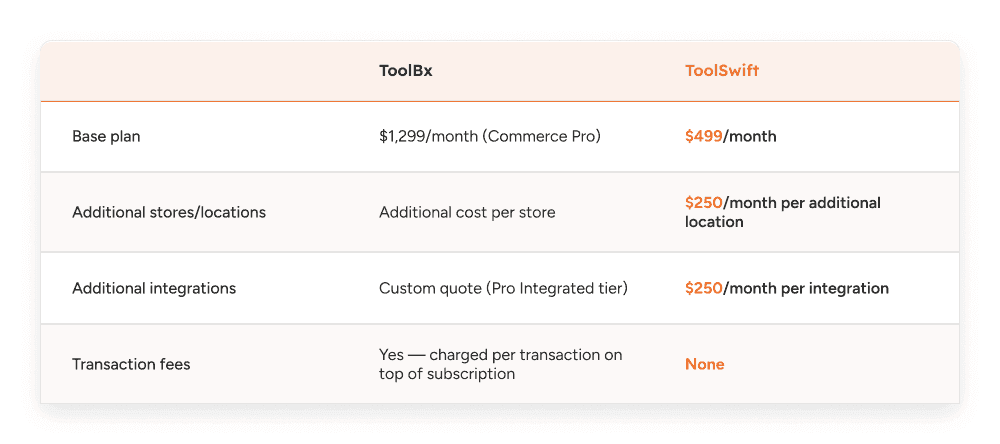
ToolBx's pricing includes a base subscription, per-store fees, and per-transaction fees, causing total costs to rise with both the number of locations and sales volume. ToolSwift charges only by the number of locations or integrations, not sales volume. As a result, multi-location dealers processing higher sales will see ToolBx costs increase monthly, while ToolSwift's fees remain consistent.
For example, consider a dealer with three locations and $150,000 in total monthly sales.
ToolBx: $1,299 base subscription + $600 per additional location + an assumed 1.5% transaction fee (ToolBx's actual transaction fee rate isn't published, so this is an estimate for illustration). With two additional locations beyond the first, that's $1,299 + (2 × $600) + ($150,000 × 1.5%) = $1,299 + $1,200 + $2,250 = $4,749 a month.
ToolSwift: $499 base subscription + $250 per additional location, with no transaction fees at all. With two additional locations, that's $499 + (2 × $250) = $999 per month, regardless of sales volume.
At this sales volume, ToolBx costs approximately $3,750 more per month than ToolSwift, or nearly $45,000 more annually. As sales increase, this gap widens because ToolBx’s fees scale with revenue, while ToolSwift’s costs remain flat. For dealers with multiple locations or expansion plans, these additional costs accumulate quickly.
Cancellations & Contract Terms
What's actually different
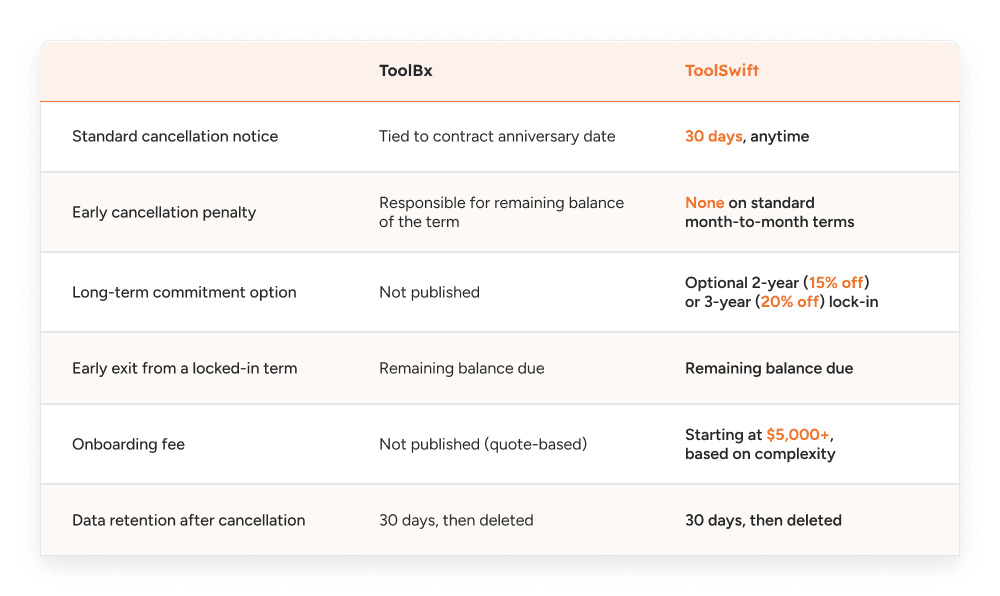
Both platforms manage standard cancellations similarly: you can exit, but a process is required. The primary difference lies in the default agreement structure. ToolBx agreements are based on a contract anniversary date, placing every customer on an annual or multi-year term with an early-exit cost by default.
ToolSwift’s default agreement is month-to-month with 30 days’ notice and no penalty. Longer commitments, and the associated liability, are optional and chosen by the dealer in exchange for a discount (15% or 20%), rather than being the default arrangement.
Where the two are genuinely the same
If a ToolSwift customer chooses a 2- or 3-year locked-in term for the discount and wants to leave early, they're in the same position as a ToolBx customer: the remaining balance of the term is owed. This is a fair trade-off for a locked-in rate, and it applies equally to both. Data retention after cancellation is also the same for both platforms: 30 days, then deletion.
The Retail Storefront Experience
Not really ToolBx's focus
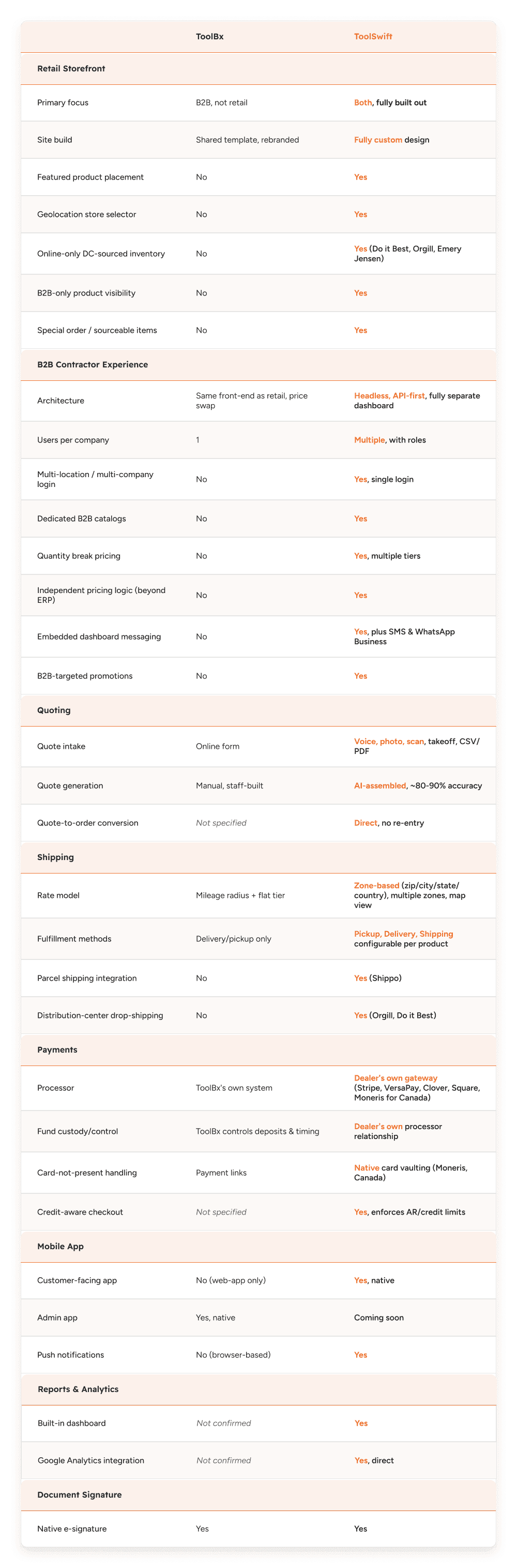
ToolBx’s retail storefront covers basic needs, but the primary focus is on B2B and contractor features, which are discussed in the next section. ToolSwift treats retail and contractor as two distinct experiences, rather than a main product with secondary features.
Impact: If most of your revenue comes from walk-in or online retail customers rather than contractor accounts, it is important to recognize this early. Platform development typically aligns with primary priorities, so retail-focused dealers may experience delays in retail enhancements if the platform is primarily built for B2B.
This is not only relevant for retail-focused dealers. Distributors with primarily contractor revenue also depend on the retail side of their site. Retail product pages are often the first point of contact, as contractors frequently discover new suppliers while searching for specific items. Retail visibility is a common entry point to B2B relationships. If a platform treats the retail experience as secondary, it may under-serve retail customers and weaken the main channel for acquiring new contractor accounts.
Design: custom build vs. rebranded template
ToolSwift's storefront is fully custom; dealers participate in a design meeting and receive a site tailored to their specifications, including layout, branding, and catalog organization. ToolBx storefronts typically use a shared template rebranded for each dealer, resulting in similar visual appearances across different companies.
Impact: A templated site is faster and less expensive to launch, but results in a store that resembles other ToolBx-powered sites. A custom-built site provides a unique online brand identity, which is important for businesses competing on reputation and service, not just price and inventory.
Featured products
ToolSwift allows dealers to manually feature specific products on the homepage, such as seasonal promotions or high-margin items. ToolBx does not offer this capability.
Impact: Featuring products is a fundamental merchandising tool, similar to end caps or front-of-store displays. Without this feature, the homepage displays catalog items by default, limiting the ability to promote or highlight specific products.
Store selector and geolocation
ToolSwift's store selector uses geolocation to automatically direct visitors to their nearest location. ToolBx requires visitors to manually select their location, as it does not provide automatic detection or routing.
Impact: While this may seem minor, it is significant for dealers with multiple locations. Each additional step before viewing accurate pricing and inventory increases friction and can lead to lost online shoppers. Automatic geolocation ensures customers see the correct prices and stock for the correct store immediately.
Available online-only inventory from distribution centers
ToolSwift storefronts can display products not stocked in any physical location, sourced live via API from distribution centers such as Do it Best, Orgill, and Emery Jensen, and labeled "Available Online Only." This extends a dealer's catalog beyond in-store inventory without requiring additional stock.
Impact: This significantly expands your website’s catalog. Customers searching for items not stocked in-store can still order through your distribution network, generating additional revenue that might otherwise go to competitors or big-box stores.
B2B-only visibility and special order items
ToolSwift allows dealers to control product visibility by customer type, enabling certain products to be shown only to logged-in B2B or contractor accounts and hidden from retail shoppers. Dealers can also list special-order items without set prices—products not stocked but available through distributor relationships—marked as available for inquiry or quote rather than for direct purchase.
Impact: These features align with modern dealer operations. B2B-only visibility enables contractor-specific products, bulk items, or trade-only pricing without cluttering the retail side or exposing prices to competitors. Special-order visibility transforms your site into a sourcing tool, helping you retain sales even for non-stocked items. Both features effectively support retail customers and contractors.
The B2B Contractor Experience
Built headless, API-first, not bolted onto a website.
Before getting into the specific differences, it's worth naming the architectural reason they exist. ToolSwift is a truly headless, API-first B2B eCommerce platform; the frontend (whatever a dealer's storefront or dashboard looks like) and the backend (catalog, pricing, orders, users, integrations) are fully decoupled, communicating through APIs rather than being locked together in one monolithic system. That's what makes it possible to run a retail storefront and a completely separate B2B contractor dashboard off the same underlying data, each built and presented independently for its audience.
In contrast, ToolBx's contractor portal functions as an extension of the main website, using the same front-end with additional tabs for logged-in accounts. This is a structural difference: when retail and B2B experiences share the same front-end, there are practical limits to how differently they can behave, appear, or function.
Impact: This architectural difference enables features such as dedicated dashboards, separate B2B catalogs, multi-user logins, integrated messaging, and tailored promotions. These are possible because the platform was designed from the outset to treat retail and B2B as distinct experiences, not simply variations of the same site.
Company and user structure: one login, multiple companies and locations
ToolBx restricts contractor accounts to one user per company. If a business has multiple individuals who need to place orders, such as a manager, purchasing lead, or foreman, ToolBx does not support separate logins under the same company account.
ToolSwift separates "user" and "company" accounts. A single company account can have multiple individual logins, each independently managed with specific roles and activation status. Additionally, a user can switch between multiple locations of the same company or between different companies if authorized, allowing, for example, a regional manager to access multiple dealer accounts without logging out.
Impact: This is essential for contractor businesses with multiple individuals placing orders. Construction and trade companies often require access for office staff, project managers, and foremen, each with different permissions. Limiting logins to one per company can lead to workarounds and bottlenecks. Multi-user, multi-location, and multi-company access aligns with real operational needs.
Catalogs, pricing, and quantity breaks
ToolBx does not offer B2B-specific catalogs; customers view the standard product catalog with adjusted pricing. There is no dedicated price list view or visibility into tiered quantity pricing beyond the displayed price.
ToolSwift enables dealers to create and assign specific catalogs to B2B accounts, separate from the general retail catalog. B2B customers can view their negotiated pricing and quantity break pricing for individual items, with multiple break tiers displayed directly on the product listing.
What lies beneath this is worth calling out on its own: ToolSwift doesn't just pass through whatever pricing data an ERP provides. It reads pricing directly from the ERP where that data and connectivity exist, but it also has its own independent B2B pricing logic in the backend. ToolSwift currently supports direct integrations with a range of commonly used ERPs in the LBM and hardware industries, including Epicor BisTrack, DMSi Agility, Spruce, ECI Advantage, and QuickBooks. For dealers using another system, ToolSwift can accommodate custom integrations through its flexible API framework, working with technical contacts to ensure compatibility with less common or in-house ERP solutions. So if a dealer's ERP doesn't support tiered pricing at all, or the integration isn't built out that deeply, ToolSwift can still construct a fully custom, customer-specific price catalog on its own, using cost pricing or retail pricing as the starting base rather than being limited to whatever the ERP is capable of returning.
Impact: Bulk-buying contractors rely on visible price breaks to make purchasing decisions. Without this information, they must call or estimate, delaying orders. Many POS or ERP systems lack advanced pricing support, but ToolSwift can create tiered, customer-specific pricing regardless of backend limitations. Dedicated catalogs also ensure contractors see only relevant products.
Credit, invoices, and statements
Both platforms provide contractor accounts with AR visibility, but ToolSwift's dashboard integrates this as a core feature. Users can view credit limits, available credit, outstanding balances (by credit and cash), full invoice history with payment status and downloadable records, and statements, all accessible from the account overview with a direct "Make a Payment" option.
Impact: For contractor accounts using net terms, clear visibility of available credit, outstanding balances, and overdue amounts is essential for managing cash flow and purchases. Presenting this information prominently emphasizes the importance of AR management in B2B relationships.
Messaging: built into the dashboard, not a bolt-on
ToolBx does not offer embedded messaging within the contractor portal. ToolSwift integrates messaging directly into the customer dashboard and connects to SMS and WhatsApp Business, allowing contractors to communicate through their preferred channel, with all conversations tracked within their account.
Impact: Contractors use various communication methods. Supporting both dashboard messaging and text ensures dealers can accommodate all preferences and keeps all conversations linked to the account.
Tailored promotions for B2B accounts
ToolBx does not offer banner promotions specific to contractor accounts; all promotional content is retail-facing. ToolSwift enables dealers to create banner promotions targeted specifically at B2B customers, separate from retail promotions.
Quoting
A quote request form vs. an AI-generated quote
ToolBx's quoting tool allows customers to submit quote requests online and provides staff with a system for managing, responding to, and tracking these requests. While this improves on phone or email quotes, it remains a digitized version of the traditional process, requiring staff to manually build quotes based on customer input.
ToolSwift goes a step further and automates the quote itself. A contractor can generate a quote starting point from multiple types of input, speaking an order out loud on-site (voice-to-order), snapping a photo of a handwritten list or spec sheet (photo recognition), scanning a barcode or printed sheet, uploading a takeoff form or blueprint, or dropping in a CSV/PDF supply list, and the system matches those items against the dealer's catalog and assembles a quote automatically, at roughly 80-90% accuracy, ready for a quick human review rather than being built from scratch.
Impact: The main difference isn’t just speed—it’s how staff spend their time. With a quote request tool, someone still has to turn a customer’s list into line items and prices, which takes real effort, especially when requests pile up. With AI-generated quotes, staff review and adjust a ready-made quote rather than building one from scratch. For dealers quoting dozens of jobs each week, this can mean the difference between keeping up and falling behind—or even winning a job before a competitor responds.
Multiple ways in, not one form
Because ToolSwift accepts voice, photo, scan, takeoff, and file upload as valid quote inputs, it's meeting contractors where they actually are, many of whom aren't going to sit down and fill out a structured quote request form from a desktop, especially mid-job on a site. A photo of a handwritten materials list texted in, or a voice memo recorded standing at a truck, becomes just as usable a starting point as a formal order.
Impact: Flexible input formats make it easier for contractors to request quotes. If the only option is a formal online form, some won’t bother—they’ll call or choose a supplier who makes it easier. Accepting photos, voice notes, or handwritten lists helps you capture business that might otherwise go elsewhere.
Quotes that become orders
Once a quote is approved, ToolSwift lets it convert directly into an order without re-entry, carrying forward the same line items, pricing, and customer account context.
Impact: This connects quoting and ordering, so there’s no need to re-enter information. Manually re-keying quotes into orders can lead to mistakes—such as incorrect quantities or prices—and waste staff time on work that’s already been done.
Shipping
Radius-and-tier vs. a full shipping module
ToolBx's current shipping setup is simple: a customer enters a mileage radius and gets a price tier based on distance. There's no deeper shipping calculator beyond that, no ability to integrate with third-party parcel shippers to ship products from the store, and no support for drop shipping from distributors.
ToolSwift's shipping module is built with three distinct fulfillment methods, Pickup, Delivery, and Shipping, each of which can be enabled or disabled down to the individual product level. That last part matters: a dealer isn't stuck with a single fulfillment rule across the whole catalog. A bulky item might only be eligible for delivery or pickup, while a small parts order might be fully shippable, and that's a per-product setting rather than a store-wide default.
Company fleet delivery: detailed zones vs. a flat radius
For a dealer's own fleet deliveries, ToolSwift allows detailed zone creation by zip code, city, state, or country, with multiple zones active at once, each carrying its own pricing tier, and all of it visualized on a map as zones are built out. ToolBx's model doesn't go beyond a radius and a flat price tier.
Impact: Real delivery costs are not the same for every distance. Delivering 3 miles away costs less than delivering 25 miles away, even if both are in the same zone. Flat pricing can overcharge nearby customers or undercharge for longer trips. Detailed delivery zones let you price deliveries more accurately, and the visual map makes it easy to adjust coverage.
Parcel shipping and distribution-center drop-shipping
ToolSwift connects to shipping integrators like Shippo for real-time parcel shipping from the store, something ToolBx doesn't currently support. Beyond that, because ToolSwift has connectivity into distribution centers like Orgill and Do it Best, a dealer can sell an item that isn't in their own inventory at all, charge the distribution center's shipping rate, and have the order fulfilled and shipped directly from the distribution center to the customer, no local stock, no local delivery involved.
Impact: This expands what you can sell, not just how you ship. You can list and sell products you do not keep in stock, with the distribution center handling fulfillment and shipping. This turns your storefront into a much larger virtual catalog, without extra inventory risk or logistics work for you.
Payments
Bring your own payment gateway vs. a fixed processor.
One of the more overlooked differences between the two platforms is that ToolSwift doesn't lock a dealer into a specific payment processor. Dealers can bring their own existing payment gateway relationship, Stripe, VersaPay, Clover, Square, and Moneris for Canadian dealers, rather than being forced onto whatever single processor the platform mandates. ToolBx's payment flow is built around its own payment link and processing system rather than giving dealers the option to plug in a processor with which they already have a relationship.
Impact: This concerns who controls your funds, not just convenience. If a platform processes payments through its own system, it controls when you are paid, can hold funds under its own policies, and charges a fee on every sale. Using your own payment gateway keeps transactions direct; funds settle on your schedule, with no third party deciding when you are paid or taking a cut. For businesses managing cash flow, control over incoming funds is a real operational risk, not just a technical detail.
This is also a significant issue for large transactions. LBM and building supply orders can be very large, sometimes tens of thousands of dollars. Third-party processors are more likely to flag, delay, or hold payments of that size because their risk policies are designed to detect unusual transactions. This can leave your cash tied up when you need it most. With your own payment gateway, large orders are treated as normal business, not as a risk, because the system recognizes your transaction history.
Card-on-file vs. payment links
ToolBx addresses phone-based, card-not-present payments with secure payment links. A dealer sends a customer a link, and the customer enters their payment details themselves each time, removing the need for staff to take a card number over the phone.
ToolSwift takes this further with native card vaulting through Moneris for Canadian dealers, tokenizing and securely storing a customer's card on file. Repeat contractor accounts don't need a new payment link generated for every single order; the card is saved and reusable, closer to a true account-based billing experience.
Payment methods and credit-aware checkout
ToolSwift supports credit cards, net terms, ACH, and digital payment options, all linked directly to a customer's AR and credit status, meaning checkout automatically enforces a customer's actual spending limit rather than relying on staff to catch it manually. ToolBx's payment options are built around card and bank transfer payments processed through their own system.
Mobile App
An admin app vs. a customer app
ToolBx does have a native mobile app for Android and iOS, but it's built for the dealer's admin side, giving staff control over their store from a phone. It's not a customer-facing app at all. Customers interacting with a ToolBx-powered store online get a web-app experience through a browser, the same functional experience available on a desktop, just responsive to a smaller screen.
ToolSwift took the opposite approach first: the native mobile app that exists today is built for the customer, not the admin. Everything available in the customer dashboard, quotes, orders, invoices, statements, catalog, messaging, is available natively on the phone, not just a responsive web view of the same thing.
Impact: This shows which audience each platform prioritized. A native app for dealer staff is helpful, but it does not assist customers who place orders and manage their accounts; they still use a browser with ToolBx. ToolSwift built the customer-facing native app first, recognizing that contractors need to place orders on-site, check invoices from their trucks, or reorder between jobs. That is what a native app is best for, not a browser tab. ToolSwift is also developing an admin app to cover both sides natively, while ToolBx’s customer experience remains browser-based.
What native actually unlocks: push notifications
Because ToolSwift's customer app is native rather than a web wrapper, it can take advantage of things a browser experience simply can't, push notifications being the clearest example. An order status update, a quote ready for approval, an invoice due, or a message from the dealer can reach a contractor directly on their phone without them needing to have a browser tab open or think to check their account.
Impact: A web app is passive; it only shows information when someone opens it. A native app with push notifications is active, alerting customers when something needs their attention. For time-sensitive updates like quotes or deliveries, this means contractors respond faster, which helps dealers get paid, approve quotes, or move orders along more quickly.
What "native" actually means, in plain terms
A web app is essentially a website made to look like an app; you open it in a browser or tap an icon that opens a browser page. It works, but it is still just a webpage. A native app is downloaded from the App Store or Google Play and installed on your phone like any other app, such as Instagram or your banking app. Because it is installed on the device, it can do things a browser cannot, such as sending notifications directly to your lock screen even when the app is not open.
Discoverability: Google, AI Assistants, and Beyond
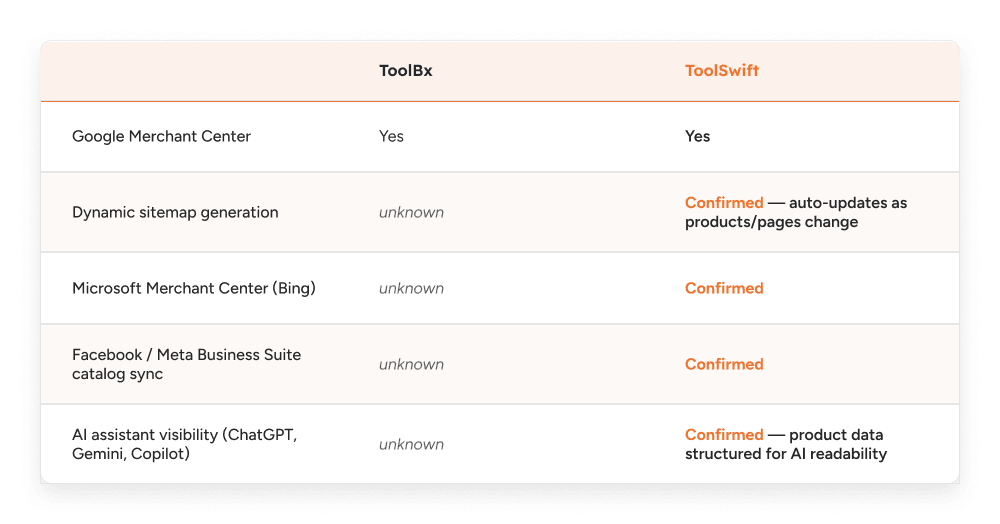
Discoverability now means more than just ranking on Google. It’s also about whether your products show up when someone asks an AI assistant, or searches on Bing or social media. If a platform only covers one channel, it limits how customers can find your products. Where we couldn’t confirm ToolBx’s features, we’ve left it as is—it’s worth checking with them if this is important to you.
Reports & Analytics
A dedicated analytics dashboard vs. no confirmed built-in reporting
ToolSwift has a dedicated Analytics section built into the platform that tracks performance across sales, orders, customers, products, pricing, inventory, and site conversions, surfacing revenue, margin, and conversion data automatically rather than requiring a dealer to pull it together manually. Site conversion and visitor data come directly through ToolSwift's Google Analytics integration on the dealer's own storefront, feeding real visitor and conversion behavior straight into the platform rather than requiring a dealer to check a disconnected GA account separately.
For ToolBx, we couldn't find any confirmed built-in reporting or analytics dashboard in their public materials. Their own guidance content on measuring e-commerce success actually points dealers toward external tools instead, social media platform analytics, email service provider analytics, and manually tracking things like active Pro customer counts, rather than describing an in-platform reporting dashboard of their own, or any direct Google Analytics integration feeding into it.
Impact: The real value of built-in analytics isn’t just having numbers—it’s being able to act on them right away. If you see a product isn’t selling well, you can adjust its price, placement, or promotion directly in the same system, using real visitor data. Analytics outside the platform, or in a separate GA account, makes it harder to quickly spot and fix problems.
Document Signature
A shared capability worth confirming
Document signature isn’t a difference between the two platforms—both ToolSwift and ToolBx offer it natively, built right into the platform without needing a third-party e-signature tool. We included this section to make it clear that ToolSwift has this feature too, so you don’t assume it’s missing just because it wasn’t mentioned earlier.
What gets signed
ToolSwift's native signature capability covers the range of documents that actually arise in a dealer-contractor relationship, including credit applications, quotes and contracts, delivery confirmations, and waivers. Rather than a customer having to print, physically sign, and return paperwork, or juggle a separate e-signature tool disconnected from their account, signing happens directly within the same platform where they're already ordering, quoting, and managing their account.
The Bottom Line
If you are reading this because you are evaluating ToolBx, or already using it and wondering whether there is a better fit, the honest answer is: it depends on what you actually need your platform to do.
ToolBx is an established platform with genuine traction in the LBM space; the SBP and Do it Best partnerships are significant, and their AR management, payment links, and ERP sync address real challenges for dealers who have not yet digitized. If your business is small, single-location, and your primary need is to get online, ToolBx will meet that requirement.
A closer look reveals a clear pattern: ToolBx began as a retail storefront, with B2B features added later. ToolSwift was built differently, as a headless, API-first platform where retail and B2B are fully separate from the start, not just two versions of the same system. This core difference is evident throughout this comparison: separate dashboards rather than just price changes; multi-user and multi-company logins rather than one login per account; AI-generated quotes rather than a request form; zone-based shipping rather than a flat radius; and a payment structure that keeps your funds under your control.
These benefits are not without cost. ToolSwift's onboarding starts at $5,000 and scales with complexity; a fully custom storefront build requires significant upfront design time. Typically, onboarding follows a clear process: initial discovery and requirements gathering, data migration and integration with your ERP or POS, retail and contractor portal design, catalog and pricing configuration, staff training, and final go-live. Most dealers can expect onboarding to take between 6 and 10 weeks, depending on data readiness and any required custom integrations. ToolSwift’s project team works with you and your staff to set milestones, provide hands-on support, and minimize downtime or disruption to your business. This upfront investment pays off in the long run: with no transaction fees, no per-store surprise charges, and a 30-day cancellation window with no penalty unless you have deliberately opted into a discounted multi-year term. Over the life of the platform, this cost structure tends to favor ToolSwift as dealer volume increases.
The real question is not which platform has more features; it is how much of your business, five years from now, you want running on a system built mainly for retail versus one that treats contractor accounts as seriously as walk-in customers. If contractor and B2B accounts are central to your future, that is the main takeaway from this comparison.
If you would like to see the difference for yourself, the quickest way is to book a live demo. We will walk you through your own catalog, POS, and a real contractor order on the platform, so you can see the differences clearly. To request a demo, visit our website and click 'Book a Demo'. We typically reply within one business day to confirm details and tailor the demo to your needs.

